


Views: 0 Author: Site Editor Publish Time: 2025-09-01 Origin: Site


A multi-sport simulator lets you play golf, soccer, and other games inside your home. You use a sports simulator to practice or compete, no matter the weather. You can enjoy golf year-round, even if you live in a small home. People in 2025 choose a home golf simulator for its convenience and realistic golf experience. New technology makes sports simulator systems more accurate and affordable. Many families now want a golf simulator for home because it saves time, fits busy lives, and brings the fun of golf and other sports indoors.
Multi-sport simulators let you play golf and many other sports indoors, anytime and in any weather.
Home golf simulators provide realistic feedback to help you improve your swing and enjoy famous courses.
Advanced sensors and cameras track your movements and give instant, accurate data for better practice.
Choose a simulator that fits your space and budget, with options for compact setups and flexible software.
Using a multi-sport simulator keeps your family active, supports skill growth, and makes practice fun.

A sports simulator brings many sports into your home. You can play soccer, baseball, basketball, and even hockey with one system. This technology uses sensors and cameras to track your movements. You swing, kick, or throw just like you would on a real field. The simulator gives you instant feedback on your performance. You can practice your skills, compete with friends, or join online leagues.
Many families choose a sports simulator because it offers variety. You do not need to buy separate equipment for each sport. You can switch from golf to soccer in seconds. The system uses a launch monitor to track the ball or puck. This monitor measures speed, angle, and spin. You see your results on a big screen. You can practice at home, rain or shine.
Tip: Try different sports to keep your practice routine fun and challenging. You can improve your skills in many areas without leaving your home.
Golf is the most popular sport in many home simulators. You can set up a home golf simulator in your living room, garage, or basement. The system uses a golf launch monitor to track every shot. This monitor measures your swing speed, ball speed, launch angle, and spin rate. You get instant feedback after each shot. You can practice your drives, chips, and putts without going to a course.
A home golf simulator lets you play famous courses from around the world. You can practice on Pebble Beach or St. Andrews. The launch monitor shows you how far your ball travels and where it lands. You can adjust your stance and grip to improve your game. Many systems offer practice modes and skill challenges. You can track your progress over time.
Golf integration also helps you analyze your swing. The launch monitor records data for every shot. You can review your stats and see where you need to improve. Some systems use advanced software to give you tips. You can practice alone or invite friends for a round of golf at home.
Here is what you get with a home golf simulator:
Realistic golf courses and practice ranges
Detailed swing and launch data from the monitor
Practice modes for driving, chipping, and putting
Multiplayer options for family and friends
Easy setup in most home spaces
A home golf simulator saves you time and money. You do not need to drive to a course or pay for range balls. You can practice whenever you want. The launch monitor makes every session productive. You see your progress and enjoy the game year-round.
Multi-sport simulator technology brings advanced features into your home. You use sensors and cameras to track every movement during golf or other sports. High-resolution cameras, often 4K or higher, capture details like clubface position, ball spin, and your stance. Fast shutter speeds freeze rapid motions, such as the moment of impact, so you can review your swing in real time or slow motion. Wide dynamic range cameras balance exposure, keeping all elements visible even with changing indoor lighting.
You benefit from high frame rates, usually 120 fps or more, which capture fast swings or shots without motion blur. Cameras optimized for low-light conditions maintain image clarity, so you get accurate feedback without extra lighting. Trigger functionality synchronizes cameras with sensors, capturing only the most important moments. This focus helps you analyze your golf swing, ball trajectory, and launch angles.
The monitor works with the sensors to measure launch speed, spin, and distance. You see instant feedback on your performance. Golf simulator technology uses these features to give you realistic practice and accurate data. You can adjust your stance or grip and see how it affects your launch and accuracy.
Note: Advanced technology in multi-sport simulators helps you improve your golf skills and overall performance by providing precise, data-driven insights.
You interact with the simulator through a user-friendly interface. The system adapts to different age groups, making sports simulation games accessible for everyone. Younger users enjoy gamified, visually rich elements like speedometers, while older users prefer simple, numerical displays. You can adjust the complexity and positioning of game elements to match your preferences.
Biofeedback features, such as breathing visualizations and haptic feedback, support physical activity and accommodate your needs. The monitor provides instant feedback, helping you track your progress during practice. You can switch between sports, join online leagues, or compete with friends.
The golf simulator experience feels realistic and engaging. You practice your swing, monitor your launch, and analyze your accuracy. The system records your stats, so you see improvement over time.
Tip: Explore different interface options to create a comfortable and motivating environment for your practice sessions.
You need to consider space before starting your golf simulator setup. Most home golf simulators require a room at least 10 feet wide, 10 feet long, and 10 feet high. This space allows you to swing a golf club safely and move around the setup. If you want to use your simulator for both right- and left-handed players, aim for a room width of about 15 feet. Compact golf simulator setups help you fit a multi-sport simulator into smaller urban homes. Many new designs use portable frames and screens, so you can move or store your setup when not in use.
Tip: Choose a free-standing golf simulator setup if you want flexibility and easy installation.
You can also use the simulator space for other activities, like a home theater. Customization options, such as lighting and sound, improve your experience and make your setup feel unique.
A realistic golf experience depends on advanced technology and quality sensor systems. Camera-based golf simulators, like Uneekor, deliver high accuracy and require less space. These systems track your swing, ball speed, and distance with precision. Realistic gameplay comes from capturing the full range of player actions, not just simple predictions. Machine learning models analyze your movements and create authentic golf and sports simulation games.
You can fine-tune your simulator to match your style or even emulate famous players. The system uses physical and contextual data, such as velocity and distance to the ball, to improve the quality of your practice. Realistic graphics and detailed feedback make every golf session feel like you are on a real course.
Note: Realism in a golf simulator setup increases the value of your practice and helps you improve performance.
The software in your golf simulator setup shapes your overall experience. Leading platforms like E6 Connect and Full Swing Golf Software offer realistic graphics, detailed swing analysis, and multi-sport capability.
Platform | Key Software | Multi-Sport Capability | Key Features |
|---|---|---|---|
TruGolf | E6 Connect | Golf-focused | 90+ courses, 3D graphics, swing analyzer |
Full Swing Golf | Full Swing Golf | Golf + other sports | Multi-sport, video playback, real-time data |
AI analytics in modern golf simulators track your biomechanics and create personalized training programs. Real-time data tracking and predictive analytics give you instant feedback and help prevent injuries. You can adjust software settings to customize your golf simulator setup for your needs.
Tip: Choose software that supports both golf and other sports to get the most value from your multi-sport simulator.
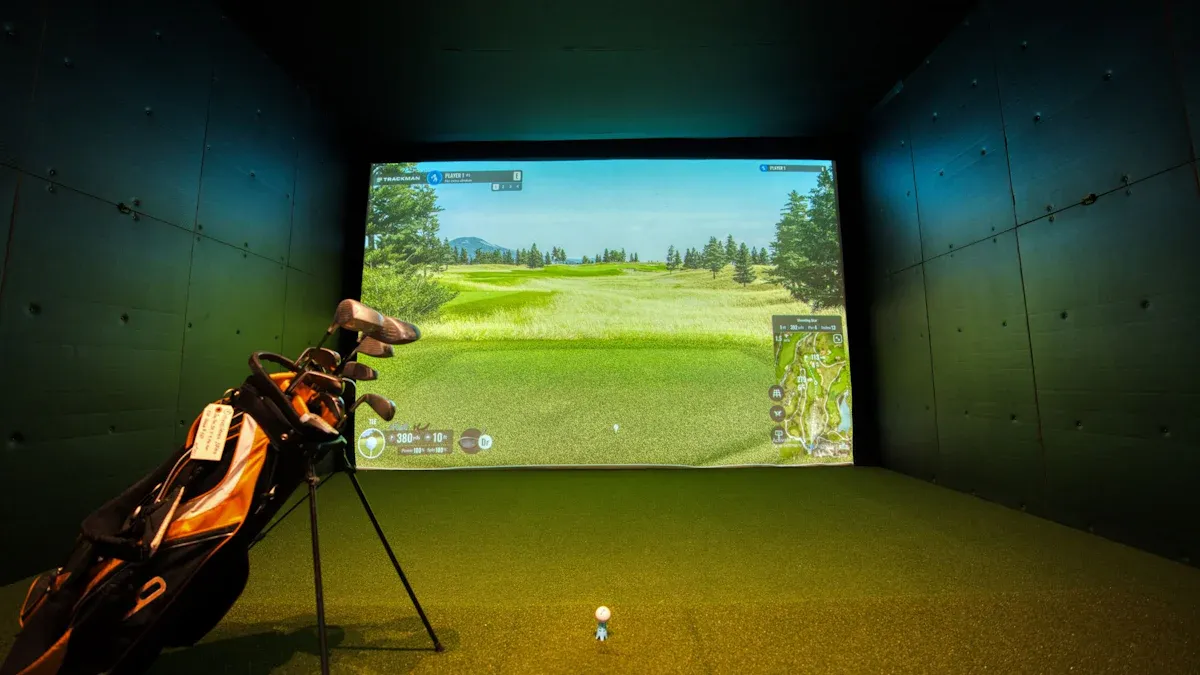
You want the best golf simulator for your home. You need a system that delivers realistic golf play, accurate launch data, and reliable performance. In 2025, several models stand out for their technology, quality, and user experience. You can choose from budget-friendly options or invest in premium setups. Here are the top models you should consider:
SkyTrak Plus: This monitor offers advanced launch tracking and high-quality graphics. You get instant feedback on ball speed, launch angle, and spin. It works well for both beginners and experienced golfers.
Foresight Sports GC3: You get professional-level accuracy and detailed swing analysis. The GC3 monitor tracks launch data with precision, making it one of the best golf launch monitors for home use.
Bushnell Launch Pro: This model combines affordability with quality. You receive reliable launch measurements and easy setup. It suits golfers who want a balance between price and performance.
TrackMan iO: You experience premium launch tracking and unmatched realism. TrackMan iO uses advanced radar and camera technology to deliver top-tier golf simulation.
Full Swing Pro 2.0: You enjoy immersive golf courses and multiplayer modes. The monitor provides instant launch feedback and supports multi-sport simulation games.
Garmin Approach R10: You get a compact, portable monitor with solid launch tracking. It fits small spaces and offers good value for home golf simulator setups.
TruGolf APOGEE: You benefit from high-speed camera tracking and realistic golf simulation. The monitor delivers accurate launch data and supports a wide range of courses.
ProTee VX: You access versatile launch tracking and multi-sport capability. The monitor works with popular software and fits various home environments.
EYE MINI Lite: You receive advanced launch monitoring in a compact design. It suits golfers who want quality and portability.
You can compare price ranges and features using the table below:
Component | Price Range | Feature Differences / Examples |
|---|---|---|
Launch Monitors | $500–$2,000 | Basic tracking units like Garmin R10, Rapsodo MLM2PRO, PRGR |
$2,000–$7,000 | Advanced units such as Mevo+, SkyTrak+, Eye Mini | |
$7,000–$25,000+ | Premium models like GCQuad, Eye XO2, TrackMan 4 | |
Simulator Software | Varies; subscription-based | Enables course play, swing analysis; some included, others require subscriptions |
Simulator Packages | $2,000–$4,000 | Entry-level bundles with basic components |
$5,000–$10,000 | Mid-tier packages with better components | |
$10,000–$25,000+ | Premium turnkey setups with top-tier gear |
Tip: Choose a launch monitor that matches your skill level and budget. You can upgrade your home golf simulator as your needs grow.
You may have limited space at home. You need a golf simulator that fits your apartment, condo, or bonus room. The Murphy Simulator is one of the best golf simulator solutions for small spaces. You fold it away when not in use, reclaiming your living area. Setup takes only two minutes, so you start playing golf quickly. The Murphy Simulator works with top launch monitors and includes a durable hitting screen, impact-resistant enclosure, and premium hitting mat.
Compare space and installation requirements:
Feature | Murphy Simulator | Traditional Mid-Tier Simulator |
|---|---|---|
Space Required | Minimal (folds away) | Permanent, large dedicated area |
Installation Time | Ready to play same day | Multiple days |
Cost | Starting at $13,000 installed | Starting at $25,000 installed |
You can use compact monitors like Garmin Approach R10 or EYE MINI Lite for small rooms. These monitors deliver reliable launch data and quality golf simulation without needing a large setup. You get flexibility and performance in a compact package.
Note: Compact golf simulators let you enjoy sports simulation games at home, even if you have limited space.
You need the right software to get the most from your home golf simulator. GSPro and E6 Connect are two of the best golf simulator software options. They enhance your experience with realistic graphics, multiplayer modes, and extensive course libraries.
Feature Category | Description |
|---|---|
Realistic Simulation | GSPro offers lifelike ball physics and 4K graphics, making your golf sessions feel authentic. |
Multiplayer Modes | Play locally or online with up to 8 players in formats like stroke, scramble, and match play. |
Course Variety | Access over 1,000 user-created, lidar-based courses for endless gameplay options. |
Hardware Compatibility | GSPro supports many launch monitors, ensuring seamless integration with your home setup. |
Customization & Integration | Open API lets you customize and expand your simulation experience. |
Continuous Updates | Regular updates add new features and keep your golf simulator fresh. |
Community Engagement | Active community creates new courses and features, growing the ecosystem. |
E6 Connect also provides high-quality graphics, swing analysis, and multi-sport capability. You can track your launch data, analyze your swing, and play famous golf courses from home. Both GSPro and E6 Connect support the best golf simulator models and monitors, giving you flexibility and control.
Tip: Select software that matches your golf goals and supports your launch monitor. You can join online leagues, compete with friends, and improve your skills using advanced analytics.
You can create a complete home golf simulator by combining a quality launch monitor, compact solution, and powerful software. You enjoy realistic golf play, instant launch feedback, and a variety of sports simulation games. You transform your home into a sports suite and experience the best golf simulator technology available.
You need to measure your room before you start your golf simulator setup. Room dimensions matter for both safety and comfort. Most home golf simulators require at least 10 feet in width, 10 feet in length, and a ceiling height of 9 to 10 feet. This space lets you swing your golf club fully without hitting the ceiling or walls. If you are tall or have a steep swing, you may need more height. Leave at least 2 feet on each side and 3 to 4 feet behind the simulator for movement and safety.
Choose equipment that fits your available space. Some launch monitors, like SkyTrak, need 10 feet from tee to screen, while others, such as Mevo+, need up to 16 feet. Projector placement and screen size should match your room size. Good lighting and temperature control also improve your golf experience at home. If you want a flexible setup, look for retractable screens or portable enclosures. Many people now turn their home spaces into sports suites, using multi-use screens for golf, movies, or gaming.
You can find a home golf simulator for almost any budget. Entry-level packages cost between $2,000 and $4,000 and include basic launch monitors, mats, and enclosures. Mid-tier setups range from $5,000 to $10,000, offering better components and more features. Premium systems can cost $10,000 to $25,000 or more, with high-end launch monitors and custom enclosures. If you want an affordable option, look for a golf simulator under $5,000.
Category | Typical Cost Range | Notes |
|---|---|---|
Entry-Level Simulator Package | $2,000 – $4,000 | Basic turnkey solutions including launch monitor, mat, projector, enclosure |
Mid-Tier Simulator Package | $5,000 – $10,000 | Enhanced features and better components |
Premium Simulator Package | $10,000 – $25,000+ | High-end launch monitors, custom enclosures, advanced software |
You also need to consider the cost of projectors, screens, mats, and software subscriptions. Affordable launch monitors start at $500, while premium models can cost over $20,000. Always balance the value you get with the total golf simulator cost. Sometimes, the best golf simulator for your needs is not the most expensive one.
Plan your installation to avoid common problems. Calibration is key for the best golf experience. Follow the setup guide and recalibrate your system often. Good lighting helps sensors track your golf shots accurately. Keep sensors clean and free from obstructions. Update your simulator software to fix bugs and get new features. If you have limited space, use retractable screens or optimize your room layout.
Installation Challenge | Cause/Issue Description | Recommended Solution(s) |
|---|---|---|
Calibration Discrepancies | Inaccurate shot tracking due to miscalibration | Frequent recalibration following the simulator's guide |
Lighting Issues | Dim lighting or glare affecting sensor accuracy | Ensure well-lit environment without harsh shadows or glare |
Space Constraints | Limited room size restricting setup | Use space-saving solutions like retractable screens or optimize room layout |
Choose a setup that matches your skills and space. Look for durable materials and easy assembly. Responsive customer support adds value to your purchase. Many people now create sports suites at home, combining golf, fitness, and entertainment in one space. This trend increases the value of your home and makes your golf simulator setup more enjoyable.
Tip: Always check the warranty and support options before you buy. These add long-term value and peace of mind.
A multi-sport simulator brings over 30 sports and games into your home, making golf and other activities accessible year-round. You enjoy a visually stunning, accurate golf experience that keeps your family active and entertained. These simulators support fitness with high-impact golf and sports activities for all ages. You can practice golf skills, join leagues, and use game improvement tools. The convenience of a golf simulator at home helps you stay fit, improve muscle memory, and enjoy social time. Consider your space, goals, and the latest golf technology when choosing the best home setup.
Offers a wide variety of sports and golf options for home entertainment
Provides year-round, weatherproof golf practice and fitness
Supports skill development and social interaction through golf leagues and tournaments
Tip: Choose a golf simulator that matches your home needs and keeps your routine fun and engaging.
A sports simulator uses sensors and software to let you play sports indoors. You can practice golf, soccer, or other sports simulation games at home. The system tracks your movements and gives instant feedback.
Yes, you can use a multi sport simulator to play golf, soccer, baseball, and more. You switch between sports simulation games easily. The sports simulator adapts to your chosen activity.
You need at least 10 feet by 10 feet of space for most sports simulator setups. Some compact multi sport simulator models fit smaller rooms. Always check the requirements for your sports league simulator before buying.
Popular sports simulator software includes GSPro and E6 Connect. These platforms support multi sport simulator features and offer realistic sports simulation games. You can join online sports leagues and track your progress.
Sports simulators provide fun and fitness for all ages. You can play sports simulation games together, compete in sports league simulator challenges, and stay active year-round. The multi sport simulator keeps everyone engaged.
